Download the
Paisabazaar app Today!
Paisabazaar app Today!
Get instant access to loans, credit cards, and financial tools — all in one place

Win Assured Cashback

Our Advisors are available 7 days a week, 9:30 am - 6:30 pm to assist you with the best offers or help resolve any queries.


Get instant access to loans, credit cards, and financial tools — all in one place

Scan to download on



 Personal Loan
 Business Loan
 Home Loan
 Other Loans


Our Advisors are available 7 days a week, 9:30 am - 6:30 pm to assist you with the best offers or help resolve any queries.
There are times when despite various efforts put by the Unique Identification Authority of India (UIDAI), an Aadhaar Cardholder faces a lot of issues such as wrong information printed on the Aadhaar Card, Aadhaar Card is generated but not delivered at the communication address, and many more.
In order to address the grievances and complaints, the ‘Unique Identification Authority of India’ (UIDAI) has set up a ‘grievance redressal system’. Moreover, a contact centre has also been set up for those who want to contact the Aadhaar issuing authority directly in person. The details for contacting the authority are mentioned below:
| Helpline Number | 1800-300-1947 |
| Email Address | help@uidai.gov.in |

Get Free Credit Report with monthly updates. Check Now
Let us now understand the common problems with Aadhaar Card and their solutions in detail.
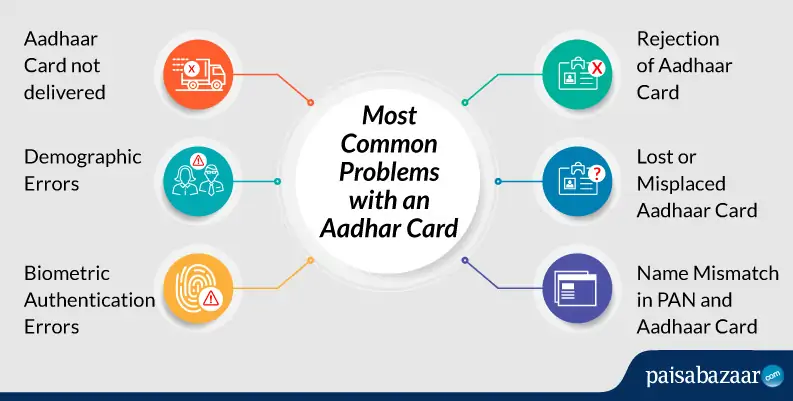
Problem 1
Rejection of Aadhaar Card
As mentioned earlier in this article, there can be various problems associated with the Aadhaar Card. However, in case your Aadhaar Card is rejected, you are immediately informed about the same through an SMS to your registered mobile number.
To rectify the problem of rejection of Aadhaar Card, you must keep the following things in mind:
Problem 2
Lost or Misplaced Aadhaar Card
Have you lost your Aadhaar or misplaced it? You don’t have to worry at all. The Unique Identification Authority of India (UIDAI) has made provisions for you where you can now easily get a duplicate Aadhaar Card through the ‘Reprint Aadhaar Card’ facility. The duplicate Aadhaar Card is considered to be equally valid.
To rectify the problem of a lost or misplaced Aadhaar Card, you need to follow the steps mentioned below:
Step 1: Visit the official UIDAI’s Portal and click on ‘Order Aadhaar Reprint (Pilot Basis)’
Step 2: Enter your 12-digit Aadhaar number or 16-digit Virtual ID (VID) and the security code
Step 3: Click on the ‘Send OTP’ button to send the OTP to the mobile number registered with Aadhaar Card
Step 4: Now, enter the OTP received on your mobile number or TOTP from the mAadhaar app and click on the ‘Submit’ button
Step 5: You need to check the details with your Aadhaar Card in the ‘Aadhaar Preview’ section
Step 6: Once done, you have to click on the ‘Make Payment’ option
Step 7: Make the payment through options like UPI/Netbanking, Debit/Credit Card
Step 8: Your request will now be processed successfully and an SRN will be generated which can be used to track the status of the Aadhaar reprint request
To know the process of how to reprint your lost Aadhaar Card in detail, click here.
Problem 3
Name Mismatch in PAN and Aadhaar Card
The Government of India has now made it mandatory to link your Aadhaar Card with PAN Card to file the Income Tax Returns. However, incorrect information/mismatch in the details such as the name, gender or date of birth, will lead to failure in linking the two documents.
However, make sure you change the name in either of the documents. You can change the name in PAN Card both online and offline. To rectify this problem, follow the steps mentioned below to change your name in PAN Card offline:
Step 1: Download and print the PAN Correction form i.e. https://www.incometaxindia.gov.in/Documents/form-for-changes-in-pan.pdf
Step 2: Enter your last name, first name, and middle (if any) as printed on your PAN card
Step 3: Now, you have to enter the ‘Name as you would like to print on the PAN Card’
Step 4: Enter the other mandatory fields as well (marked with *)
Step 5: Attach the supporting documents like your POA, POI, date of birth proof, signature, and photograph
Step 6: Attach the Demand Draft (DD) of Rs. 110 (communication address within India) or Rs. 1020 (communication address outside India) along with the PAN Card Correction/Update form
Step 7: Now, send this form to the NSDL’s address at
INCOME TAX PAN SERVICES UNIT (Managed by NSDL e-Governance Infrastructure Limited),
5th Floor, Mantri Sterling, Plot No. 341, Survey No. 997/8,
Model Colony, Near Deep Bungalow Chowk, Pune – 411 016
Step 8: Once the name on your PAN Card is updated, it will be delivered to the address of the correspondence mentioned in the form
To know how to change/update name in PAN Card online, click here.
Problem 4
Aadhaar Card not delivered to the Resident
There are times when an Aadhaar Card is not delivered even after the stipulated time of three months through the post. There could be multiple reasons why the Aadhaar Card doesn’t get delivered such as technical errors, improper verification, incorrect information, loss of encryption, and many more.
As a solution, you might have to apply for Aadhaar Card all over again in case you have not received it as the Unique Identification Authority of India (UIDAI) will reject your application if it was issued date prior to 1st April 2020. You can contact the Aadhaar issuing authority at the number of email ID mentioned above.
However, you need to make sure that your Aadhaar application was generated before you raise your complaint. You can also download e-Aadhaar in case your Aadhaar Card is not delivered through post.
Problem 5
Demographic Errors
When you apply for an Aadhaar Card, it is important that you provide all the correct data and preview the Aadhaar application form twice before submitting it. In case, the errors are still there, you are still given the chance to correct it before finally submitting it. One the errors are rectified, your Aadhaar Application form will be accepted.
Moreover, if the errors are not corrected you may have to visit the Aadhaar Enrolment Center to rectify the demographic errors. You need to submit the valid documents and the Aadhaar Enrolment Form at the Center.
Problem 6
Biometric Authentication Errors
To apply for an Aadhaar Card, the Unique Identification Authority of India (UIDAI) does a biometric authentication in order to identify your identity by evaluating or more distinguishing biological traits such as fingerprints, iris scans, etc.
To update/correct your Aadhaar Biometrics, you need to follow the steps mentioned below:
It is worth noting that children have to update their biometric in Aadhaar when they reach the age of 5 and 15 years. This is done to ensure that the biometric data remains valid as the children grow up. To update Aadhaar biometrics for your children between age 5 and 15, you need to do the following things:
If the child is below the age of 5 years:
If the child is above the age of 5 years:
It is worth mentioning that the UIDAI in order to protect and secure the biometrics data of the Aadhaar Cardholder, provides the facility of biometric locking. However, after locking your biometrics, the authentication is not possible and thus to authenticate or verify using biometric data, the biometric it has to be unlocked first. To know in detail, click here.
Get Free Credit Report with monthly updates. Check Now
Conclusion:
Since an Aadhaar Card is one of the most important documents, it is important for the Unique Identification Authority of India to ensure that Aadhaar Cards are issued without any trouble to the citizens and their queries (if any) must be resolved as the top most priority. An Aadhaar Cardholder on the other hand must also diligently apply/update for an Aadhaar Card in order to avoid any issues.
About Aadhaar
An Aadhaar Card is a 12-digit unique identification number to all residents of India issued by the Unique Identification Authority of India by providing the biometric and demographic details. It is considered to be one of the most important documents and it serves as the proof of identity. It is worth mentioning that an Aadhaar Card is not a ‘citizenship’ document for the citizens of India.
However, there are various benefits of having an Aadhaar Card can be used as a proof of residence/address, for opening a fixed deposit, for filing the Income Tax Return, for availing various subsidies provided by the Indian Government, for opening a bank account, and more.